· Arun Lakshman · devops · 17 min read
What is Blue Green Deployments
Blue-green deployments keep production stable by swapping traffic between two identical environments so updates ship without downtime.
Blue-Green Deployments: An Introduction
TLDR: Blue-green deployments eliminate downtime and deployment risk by maintaining two identical production environments. You deploy new versions to the inactive environment, validate thoroughly, then switch traffic atomically. If issues arise, reverting is instantaneous—just flip the switch back. This pattern trades infrastructure cost for operational safety and has saved my team countless 3 AM rollback sessions.
The Core Concept
The main idea: Blue-green deployments let you release new software versions with zero downtime and instant rollback capability by maintaining two identical production environments and switching traffic between them.
At its essence, blue-green is about risk mitigation through redundancy. Instead of updating your production environment in-place—where a failure means downtime and a stressful rollback—you prepare a parallel environment, prove it works, then redirect users to it. The old environment stays warm and ready, so reverting is just another traffic switch.
After a decade of production incidents, I’ve learned that the ability to roll back in seconds (not minutes or hours) is worth the extra infrastructure cost. The pattern eliminates entire categories of deployment failures: botched database migrations, incompatible dependency updates, memory leaks that only appear under load. You catch them all in the green environment before users see them.
What is Blue-Green Deployment?
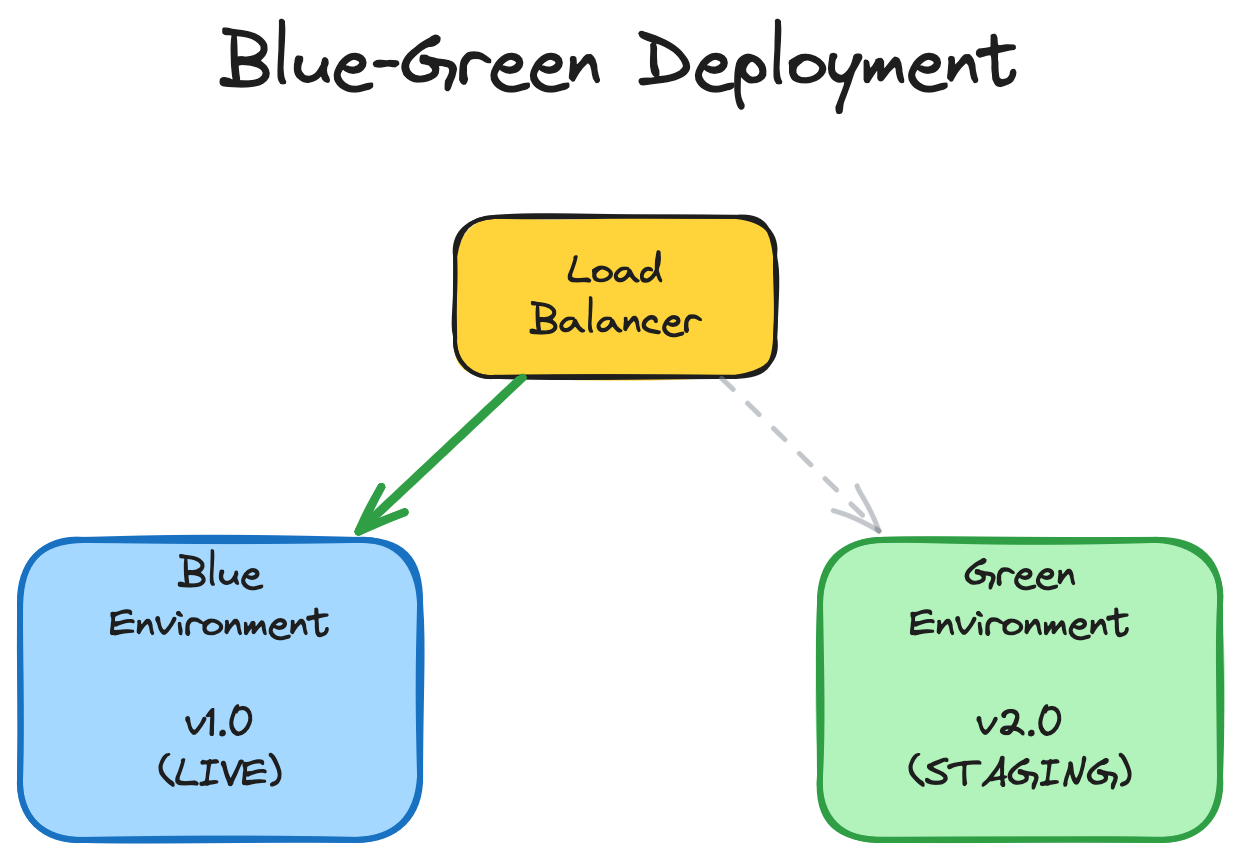
Blue-green deployment is a release management pattern where you maintain two identical production environments—traditionally called “blue” and “green”—but only one serves live traffic at any time. When deploying:
- The blue environment serves production traffic
- Deploy the new version to the green environment (idle)
- Test and validate green thoroughly
- Switch the router/load balancer to direct traffic to green
- Blue becomes the idle environment, ready for the next deployment
The critical architectural component is the traffic router—a layer 7 load balancer, reverse proxy, or DNS system that can atomically switch which environment receives requests. This router becomes your deployment control plane.
I’ve implemented this pattern at the network level (DNS), application level (service mesh), and database level (read replicas with promotion). Each has tradeoffs, but they all share the same fundamental benefit: deployments become boring, predictable operations instead of white-knuckle events.
The Architecture
                    ┌─────────────┐
                    │   Router    │
                    │ (HAProxy/   │
                    │  Nginx/etc) │
                    └─────┬───────┘
                          │
                ┏━━━━━━━━━┻━━━━━━━━━┓
                ┃ Traffic Switch    ┃
                ┗━━━━━━━━━┳━━━━━━━━━┛
                          │
         ┌────────────────┴────────────────┐
         │                                 │
    ┌────▼─────┐                     ┌─────▼────┐
    │   Blue   │ <-- Active          │  Green   │
    │  (v1.2)  │                     │  (v1.3)  │
    └────┬─────┘                     └─────┬────┘
         │                                 │
    ┌────▼─────┐                     ┌─────▼────┐
    │    DB    │                     │    DB    │
    │ Primary  │ <-- replication ----│ Replica  │
    └──────────┘                     └──────────┘
For more on the underlying architectural patterns, see Martin Fowler’s definitive article on BlueGreenDeployment.
Why Use Blue-Green Deployments?
The Strategic Value
Instant rollback capability is the killer feature. In a traditional rolling deployment, rolling back means deploying the old version again—another 10-30 minute process that extends your incident. With blue-green, rollback is instantaneous because the old version is still running. Switch traffic back, and you’ve recovered.
Zero-downtime deployments become straightforward. There’s no moment where half your fleet runs v1.2 and half runs v1.3. Users hit one version or the other—never a mixed state. This eliminates an entire class of race conditions and state inconsistencies.
Comprehensive testing in production conditions before real users see the changes. The green environment handles synthetic traffic, load tests, smoke tests, and integration tests against real production data while blue serves users. You catch issues early when the blast radius is zero.
Reduced deployment fear changes team culture. When deployments are safe and boring, you deploy more frequently. Smaller, more frequent deployments mean less risk per deployment and faster feature delivery. This compounds: better deployment practices enable better development practices.
What This Costs You
Infrastructure overhead is the obvious tradeoff—you need 2x capacity (though you can sometimes share databases). For compute-heavy workloads, this gets expensive. But consider the cost of downtime: five minutes of downtime for a high-traffic service often costs more than a month of doubled infrastructure.
Operational complexity increases. You need sophisticated traffic routing, environment synchronization, and careful state management. The router becomes a critical single point of failure (though it’s usually stateless and easy to make redundant).
Database handling adds nuance. Schema changes require backward-compatible migrations so blue and green can share the database temporarily. I’ll cover this in detail below—it’s where most teams struggle initially.
For further context on deployment pattern tradeoffs, the DORA State of DevOps Research provides data-driven insights on deployment frequency and stability.
How Blue-Green Deployment Works
Step-by-Step Process
Phase 1: Preparation (Green is Idle)
Blue environment serves production. Green sits idle or handles background jobs. Your CI/CD pipeline builds the new version (v1.3).
Phase 2: Deployment to Green
Deploy v1.3 to the green environment. This includes:
- Application binaries/containers
- Configuration updates
- Database migration scripts (if needed)
- Dependency updates
At this point, green is running v1.3 but receives no user traffic. The deployment can take as long as needed without affecting users.
Phase 3: Validation
This is where blue-green shines. Run comprehensive tests against green:
# Smoke tests
curl -f https://green.internal.example.com/health || exit 1

# Integration tests
./run_integration_tests.sh --target=green

# Load testing
k6 run --vus 1000 --duration 5m load_test.js

# Synthetic user flows
./selenium_tests.sh --env=green
You’re testing against production infrastructure, production databases (via read replicas or shared DB), and production-like load. Issues found here cost nothing because users haven’t seen them yet.
Phase 4: Traffic Switch
Update the router configuration to point at green. The implementation varies:
DNS-based (slowest, simplest):
# Update DNS records
aws route53 change-resource-record-sets \
  --hosted-zone-id Z1234 \
  --change-batch '{"Changes":[{"Action":"UPSERT","ResourceRecordSet":{"Name":"api.example.com","Type":"A","ResourceRecords":[{"Value":"10.0.2.100"}]}}]}'
Load balancer-based (fast, common):
# HAProxy backend switch
echo "set server backend/green-pool state ready" | socat stdio /var/run/haproxy.sock
echo "set server backend/blue-pool state maint" | socat stdio /var/run/haproxy.sock
Service mesh-based (modern, sophisticated):
# Istio VirtualService
apiVersion: networking.istio.io/v1beta1
kind: VirtualService
metadata:
  name: api-service
spec:
  hosts:
  - api.example.com
  http:
  - route:
    - destination:
        host: api-green
      weight: 100
The switch should be atomic from the user’s perspective. Existing connections either drain gracefully or fail over cleanly depending on your requirements.
Phase 5: Monitoring
Watch metrics closely for 15-60 minutes:
- Error rates
- Latency (p50, p95, p99)
- Traffic volume
- Business metrics (signups, checkouts, etc.)
Set up automated rollback triggers. If error rate exceeds threshold, revert automatically:
# Pseudocode for automated rollback
if current_error_rate > baseline_error_rate * 1.5:
    rollback_to_blue()
    trigger_incident_response()
Phase 6: Cleanup
After soak period (often 24-48 hours), if green is stable:
- Blue becomes the new idle environment
- Next deployment goes to blue
- Document any issues found and resolved
For implementation examples, see the Kubernetes documentation on zero-downtime deployments.
Handling Database Changes
Database handling is the sharp edge of blue-green deployments. The challenge: both environments often share the same database, so schema changes must be backward-compatible.
The Three-Phase Migration Pattern:
Phase 1: Expand (make schema forward-compatible)
-- Deploy v1.2 → v1.3 migration
-- Add new columns but keep old ones
ALTER TABLE users ADD COLUMN email_verified BOOLEAN DEFAULT false;
ALTER TABLE users ADD COLUMN verification_token VARCHAR(255);

-- Application v1.3 uses new columns
-- Application v1.2 ignores them
Deploy v1.3 to green. Both v1.2 (blue) and v1.3 (green) work with this schema.
Phase 2: Migrate (dual-write period)
# v1.3 code writes to both old and new schema
def verify_user(user_id):
    user.verified = True  # Old column (v1.2 compatible)
    user.email_verified = True  # New column (v1.3)
    user.save()
Switch traffic to green. Monitor. After soak period, blue is deactivated.
Phase 3: Contract (remove old schema)
-- In next deployment (v1.4), remove old columns
ALTER TABLE users DROP COLUMN verified;
This expand-contract pattern is tedious but necessary. Tools help:
- Flyway for version-controlled migrations
- gh-ost for online schema changes
- Liquibase for database refactoring
For read-heavy workloads, consider read replicas:
- Blue uses primary database (read-write)
- Green uses replica for testing (read-only)
- After switch, promote replica to primary
- Old primary becomes replica
This adds complexity but isolates green’s testing from production load.
The Refactoring Databases book by Scott Ambler provides comprehensive patterns for evolutionary database design.
When to Use (and When Not to Use) Blue-Green
Ideal Use Cases
Stateless applications are perfect candidates. If your service doesn’t maintain local state between requests, blue-green is straightforward. Web APIs, microservices, and serverless functions fit naturally.
High-availability requirements justify the cost. If downtime costs thousands per minute, 2x infrastructure is cheap insurance. Financial services, e-commerce during peak seasons, and healthcare systems benefit enormously.
Frequent deployments amortize the setup cost. If you deploy multiple times per day, investing in blue-green automation pays dividends quickly. The pattern enables the deployment frequency that enables everything else.
Regulated industries appreciate the audit trail. Blue-green provides clear evidence of what was deployed when, what testing occurred, and how rollbacks were performed. This documentation matters for compliance.
When to Choose Something Else
Stateful applications complicate blue-green significantly. Databases, caching layers, and services with persistent connections need special handling. Consider canary deployments or rolling updates instead.
Small traffic volumes may not justify the complexity. If you’re a three-person startup with 100 users, in-place deployments with brief downtime might be fine. Optimize for development velocity, not deployment sophistication.
Tight infrastructure budgets make 2x capacity prohibitive. For compute-intensive workloads (ML training, video processing), the cost can be substantial. Consider canary deployments with gradual rollout instead.
Immature CI/CD pipelines should stabilize basic deployments first. Blue-green adds complexity that compounds when your pipeline is flaky. Get single-environment deployments reliable before doubling your infrastructure.
Shared resource constraints can be showstoppers. If you’re quota-limited on IP addresses, load balancers, or database connections, blue-green might not be feasible without significant re-architecture.
Combining Blue-Green with Feature Flags
Blue-green and feature flags are complementary patterns that together provide exceptional deployment safety.
Deployment vs. Release Separation
Blue-green handles deployment: getting code into production.
Feature flags handle release: enabling features for users.
// Code deployed to green environment
if (featureFlags.isEnabled('new-checkout-flow', user)) {
  return renderNewCheckout();
} else {
  return renderOldCheckout();
}
Deploy to green with new feature flagged off. Switch traffic to green. Monitor. Enable feature flag for 1% of users. Gradually increase. If issues arise, disable flag—no deployment needed.
This multi-layered safety net catches different failure modes:
- Blue-green catches infrastructure/dependency issues
- Feature flags catch feature-specific issues
Progressive Delivery Pattern
Combine blue-green with gradual feature rollout:
- Deploy v1.3 to green with feature flagged off
- Switch traffic to green (100% users on v1.3, feature disabled)
- Enable feature for 1% of users
- Ramp to 5%, 25%, 50%, 100%
- Remove flag in next deployment
This pattern gives you multiple rollback points. If infrastructure fails, revert to blue. If the feature fails, disable the flag. You’ve decoupled deployment risk from feature risk.
Implementation Example
# Feature flag service
class FeatureFlags:
    def is_enabled(self, flag_name, user_id):
        flag_config = self.get_flag_config(flag_name)

        if not flag_config.enabled:
            return False

        # Percentage rollout
        if random.random() * 100 < flag_config.percentage:
            return True

        # User whitelist
        if user_id in flag_config.whitelist:
            return True

        return False

# Application code
if feature_flags.is_enabled('new-recommendation-engine', user.id):
    recommendations = new_recommendation_engine.get(user)
else:
    recommendations = old_recommendation_engine.get(user)
For feature flag best practices, see LaunchDarkly’s Guide to Feature Management and Pete Hodgson’s Feature Toggles article.
Common Challenges and Solutions
Challenge 1: Database State Synchronization
Problem: Blue and green share a database, but schema changes break compatibility.
Solution: Backward-compatible migrations using expand-contract pattern (detailed above). Alternatively, use separate databases with replication:
# Blue primary, green replica setup
postgresql-primary (blue) --> postgresql-replica (green)

# After switch
postgresql-replica (green, promoted) --> postgresql-replica (blue, demoted)
Promotion must be fast and reliable. Test your failover process regularly.
Challenge 2: Asynchronous Job Processing
Problem: Background jobs (queues, cron jobs, scheduled tasks) running in both environments cause duplicate processing or race conditions.
Solution: Designate one environment as “active” for background jobs, separate from user-facing traffic:
# Environment configuration
blue:
  serving_traffic: true
  processing_jobs: false

green:
  serving_traffic: false
  processing_jobs: true
During switch, transfer job processing responsibility:
# Job processor leader election
def should_process_jobs():
    return consul.get('job-processor-leader') == current_environment
For critical jobs, use distributed locking (Redis, ZooKeeper, etcd) to ensure exactly-once processing.
Challenge 3: Persistent Connections
Problem: WebSocket connections, streaming responses, and long-polling remain on blue after traffic switch.
Solution: Implement graceful connection draining:
// Server-side connection management
function switchToGreen() {
  // 1. Stop accepting new connections on blue
  blueServer.close();

  // 2. Send graceful disconnect to existing connections
  blueConnections.forEach(conn => {
    conn.send({ type: 'reconnect', reason: 'deployment' });
  });

  // 3. Wait for connections to drain (with timeout)
  await waitForDrain(blueConnections, timeout=30000);

  // 4. Switch traffic to green
  router.setActiveBackend('green');
}

// Client-side reconnection
websocket.on('message', (msg) => {
  if (msg.type === 'reconnect') {
    websocket.close();
    reconnect();  // Connects to new environment
  }
});
For stateful protocols like gRPC, use connection draining headers and client-side retry logic.
Challenge 4: External Service Integration
Problem: Third-party services (payment processors, email providers) cache endpoints or webhooks pointing to specific environments.
Solution: Use stable external endpoints that map to internal blue/green environments:
External view:  https://api.example.com  (never changes)
                        ↓
Internal routing:  → blue.internal (currently active)
                   → green.internal (currently idle)
Configure webhooks to use stable external endpoints:
# Webhook registration
payment_provider.register_webhook(
    url="https://api.example.com/webhooks/payment",  # Stable
    events=["payment.success", "payment.failed"]
)

# Internal routing handles blue/green
# External services never know about blue/green
Challenge 5: Configuration Drift
Problem: Over time, blue and green environments drift apart (different OS patches, library versions, configs).
Solution: Infrastructure as Code (IaC) with strict version control:
# Terraform example
module "blue_environment" {
  source = "./environment"
  version = "1.3.0"
  environment_name = "blue"
  app_version = var.blue_app_version
}

module "green_environment" {
  source = "./environment"
  version = "1.3.0"  # Same version!
  environment_name = "green"
  app_version = var.green_app_version
}
Automate environment provisioning. Never manually modify production environments. Use tools like Terraform, Pulumi, or Ansible.
Regularly tear down and rebuild both environments from scratch to verify your automation is complete.
Blue-Green vs. Other Deployment Strategies
Understanding where blue-green fits in the deployment strategy landscape helps you choose the right pattern for your needs.
Blue-Green vs. Rolling Deployment
Rolling Deployment:
- Gradually updates instances: 10% → 25% → 50% → 100%
- Lower infrastructure cost (no 2x capacity)
- Slower rollback (must deploy old version again)
- Mixed versions running simultaneously
Blue-Green:
- Instant switch: 0% → 100%
- Higher infrastructure cost (2x capacity)
- Instant rollback (switch back)
- Only one version running at a time
When to choose rolling: Cost-sensitive environments, large fleets where 2x capacity is prohibitive, services that tolerate mixed-version deployments.
When to choose blue-green: Mission-critical services, deployments where rollback speed matters, applications sensitive to mixed-version states.
Blue-Green vs. Canary Deployment
Canary Deployment:
- Route small percentage of traffic to new version: 1% → 5% → 25% → 100%
- Detects issues with minimal user impact
- Requires sophisticated traffic splitting
- Gradual confidence building
Blue-Green:
- All-or-nothing traffic switch
- Detects issues in pre-production testing
- Simpler traffic routing
- Binary confidence (tested or not)
When to choose canary: Large user bases where 1% is statistically significant, services with diverse traffic patterns, when you want to detect rare edge cases in production.
When to choose blue-green: When pre-production testing is comprehensive, when instant rollback is critical, when you want simplicity over gradualism.
Many teams use both: blue-green for deployment safety, canary for release safety:
- Deploy v1.3 to green
- Switch 100% traffic to green (blue-green)
- Use feature flags to canary the new feature
Blue-Green vs. Recreate Deployment
Recreate Deployment:
- Stop old version, start new version
- Downtime during transition
- Simple and cheap
- Complete environment reset
Blue-Green:
- Zero downtime
- Complex and expensive
- Gradual transition possible
- Environments persist
When to choose recreate: Development/staging environments, batch processing systems, scheduled maintenance windows, services where brief downtime is acceptable.
When to choose blue-green: User-facing services, 24/7 operations, when downtime is expensive.
For a comprehensive comparison, see DigitalOcean’s Deployment Strategies article.
Getting Started with Blue-Green Deployments
Implementing blue-green requires planning and incremental rollout. Here’s a practical path forward.
Phase 1: Prepare Your Architecture (Weeks 1-2)
Audit state management: Identify stateful components. Document database schema change requirements. Map out persistent connections and background jobs.
Implement health checks: Robust health endpoints are critical for automated traffic switching:
@app.route('/health')
def health_check():
    checks = {
        'database': check_database_connection(),
        'cache': check_cache_connection(),
        'queue': check_queue_connection(),
        'disk_space': check_disk_space(),
    }

    all_healthy = all(checks.values())
    status_code = 200 if all_healthy else 503

    return jsonify(checks), status_code
Standardize configuration: Use environment variables or configuration management. Blue and green should differ only in identifier, not structure:
# Blue environment
ENVIRONMENT_NAME=blue
DATABASE_URL=postgresql://db-primary/myapp
APP_VERSION=1.2.0

# Green environment
ENVIRONMENT_NAME=green
DATABASE_URL=postgresql://db-primary/myapp
APP_VERSION=1.3.0
Phase 2: Build Traffic Switching Mechanism (Weeks 3-4)
Choose your routing layer:
Option A: DNS-based (easiest, slowest)
- Update DNS records to switch traffic
- Pros: Simple, no new infrastructure
- Cons: DNS caching delays (TTL), not instant
Option B: Load balancer-based (recommended)
- HAProxy, Nginx, Traefik with dynamic backends
- Pros: Instant switching, fine-grained control
- Cons: Requires load balancer configuration automation
Option C: Service mesh-based (most sophisticated)
- Istio, Linkerd, Consul Connect
- Pros: Advanced traffic shaping, observability
- Cons: Significant operational overhead
Implement automated switching:
#!/bin/bash
# switch_traffic.sh

ENVIRONMENT=$1  # blue or green

# Update load balancer
echo "Switching traffic to ${ENVIRONMENT}..."
curl -X PUT http://lb-admin:8080/config \
  -H "Content-Type: application/json" \
  -d "{\"active_backend\": \"${ENVIRONMENT}\"}"

# Verify switch
ACTIVE=$(curl -s http://lb-admin:8080/config | jq -r '.active_backend')
if [ "$ACTIVE" == "$ENVIRONMENT" ]; then
  echo "Traffic switched successfully to ${ENVIRONMENT}"
  exit 0
else
  echo "Traffic switch failed!"
  exit 1
fi
Phase 3: Automate Deployment Pipeline (Weeks 5-6)
Build deployment automation:
# .gitlab-ci.yml example
stages:
  - build
  - deploy
  - test
  - switch

deploy_to_green:
  stage: deploy
  script:
    - ./deploy.sh green $CI_COMMIT_SHA
    - sleep 30  # Wait for startup
  only:
    - main

test_green:
  stage: test
  script:
    - ./smoke_tests.sh green
    - ./integration_tests.sh green
    - ./load_test.sh green
  only:
    - main

switch_to_green:
  stage: switch
  script:
    - ./switch_traffic.sh green
    - ./monitor.sh green 900  # Monitor for 15 minutes
  when: manual  # Require manual approval
  only:
    - main
Implement automated rollback:
# monitor_and_rollback.py
import time
import requests

def monitor_environment(environment, duration_seconds, error_threshold=0.05):
    start_time = time.time()

    while time.time() - start_time < duration_seconds:
        metrics = get_metrics(environment)

        if metrics['error_rate'] > error_threshold:
            print(f"Error rate {metrics['error_rate']} exceeds threshold {error_threshold}")
            print("Rolling back...")
            rollback(environment)
            raise Exception("Automated rollback triggered")

        time.sleep(30)

    print(f"Monitoring complete. {environment} is stable.")

def rollback(environment):
    previous_env = 'blue' if environment == 'green' else 'green'
    switch_traffic(previous_env)
    send_alert(f"Rolled back from {environment} to {previous_env}")
Phase 4: Test in Non-Production (Week 7)
Deploy to staging using blue-green pattern:
- Catch tooling issues
- Train team on new workflow
- Refine runbooks
Run disaster recovery drills:
- Practice rollbacks under pressure
- Time your rollback procedures
- Document failure modes
Phase 5: Production Rollout (Week 8+)
Start with low-risk service:
- Choose internal API or low-traffic service
- Validate pattern before applying to critical services
Gradual expansion:
- Week 8: First production blue-green deployment
- Week 10: Second service
- Week 14: High-traffic service
- Week 16: Database-heavy service
Iterate based on lessons learned:
- Document issues encountered
- Refine automation based on real-world usage
- Share knowledge across teams
Essential Tooling
Infrastructure as Code:
- Terraform - Multi-cloud infrastructure provisioning
- Pulumi - IaC using general-purpose languages
- Ansible - Configuration management
Load Balancing/Traffic Routing:
- HAProxy - Fast, reliable load balancer
- Nginx - Web server and reverse proxy
- Traefik - Cloud-native application proxy
- Envoy - Service proxy for service meshes
Monitoring and Observability:
- Prometheus - Metrics collection and alerting
- Grafana - Metrics visualization
- Jaeger - Distributed tracing
CI/CD:
- Jenkins - Automation server
- GitLab CI - Integrated CI/CD
- GitHub Actions - Workflow automation
- ArgoCD - GitOps continuous delivery
Service Mesh (Advanced):
- Istio - Feature-rich service mesh
- Linkerd - Lightweight service mesh
- Consul Connect - Service mesh by HashiCorp
Conclusion
Blue-green deployments represent a maturity milestone in deployment practices. The pattern trades infrastructure cost for operational safety—a trade that becomes increasingly favorable as your service grows.
After a decade of production deployments, I’ve learned that deployment fear is the mind-killer. It prevents frequent releases, encourages large risky batch changes, and creates a vicious cycle. Blue-green breaks this cycle. It makes deployments boring. And boring deployments are safe deployments.
The pattern isn’t appropriate for every service, especially early-stage products where velocity matters more than reliability. But for services where downtime costs real money or user trust, the investment pays dividends quickly.
Start small. Choose one service. Build the automation. Practice the rollback. Learn the sharp edges. Then expand to other services. Within a few quarters, you’ll wonder how you ever deployed any other way.
The goal isn’t perfect deployments—perfection is impossible. The goal is fast recovery from imperfect deployments. Blue-green gives you that recovery speed.
Further Reading
Foundational Concepts
- Martin Fowler - BlueGreenDeployment - The definitive introduction to the pattern
- Continuous Delivery by Jez Humble and David Farley - Essential reading for deployment automation
- Site Reliability Engineering (Google) - Real-world operational practices at scale
Deployment Patterns
- Feature Toggles (aka Feature Flags) by Pete Hodgson - Comprehensive guide to feature management
- Canary Releases by Danilo Sato - Progressive delivery patterns
- DigitalOcean - Deployment Strategies - Comparison of deployment approaches
Database Migrations
- Refactoring Databases by Scott Ambler - Evolutionary database design patterns
- Expand-Contract Pattern - Managing backward-compatible changes
- gh-ost by GitHub - Triggerless online schema migrations for MySQL
Traffic Management
- HAProxy Documentation - Advanced load balancing configurations
- Nginx Admin Guide - Production-grade reverse proxy setup
- Istio Traffic Management - Service mesh routing capabilities
Monitoring and Observability
- Google SRE: Monitoring Distributed Systems - What to monitor and why
- Prometheus Best Practices - Metrics naming and instrumentation
- Distributed Tracing with Jaeger - Request flow visualization
Automation and Tooling
- Terraform Documentation - Infrastructure as Code best practices
- GitLab CI/CD Documentation - Pipeline automation examples
- ArgoCD Documentation - GitOps for Kubernetes deployments
Research and Industry Practices
- DORA State of DevOps Research - Data-driven insights on deployment practices and organizational performance
- Accelerate (Book) by Nicole Forsgren, Jez Humble, Gene Kim - Science of DevOps performance
- The Phoenix Project by Gene Kim - DevOps transformation narrative (fiction but insightful)
Advanced Topics
- Service Mesh Patterns - Advanced traffic management
- Testing in Production by Charity Majors - Progressive delivery and observability
- Chaos Engineering by Netflix - Proactive resilience testing
Written by an engineer who has spent too many nights rolling back failed deployments and has the scars to prove it. May your deployments be boring and your rollbacks instant